> ## Documentation Index
> Fetch the complete documentation index at: https://docs.context.dev/llms.txt
> Use this file to discover all available pages before exploring further.
> ## Agent Instructions
> Setting up Context.dev for a user? Follow https://docs.context.dev/agent-quickstart.md. MCP clients sign in with OAuth and need no API key; application code reads CONTEXT_DEV_API_KEY.
# Logo Link
> Embed a company logo using a public client ID and referring-domain restrictions.
Logo Link returns image bytes for a company domain. Use the generated URL directly as an image source when you need lightweight logo display in a browser, email, or spreadsheet.
Logo Link is for direct image embedding. Do not download, persist, or rehost the returned image file. Browser and CDN caching directed by the response headers is allowed.
## Before you start
Open the [Logo Link dashboard](https://context.dev/dashboard/logolink) and copy the value under **Public Client ID**.
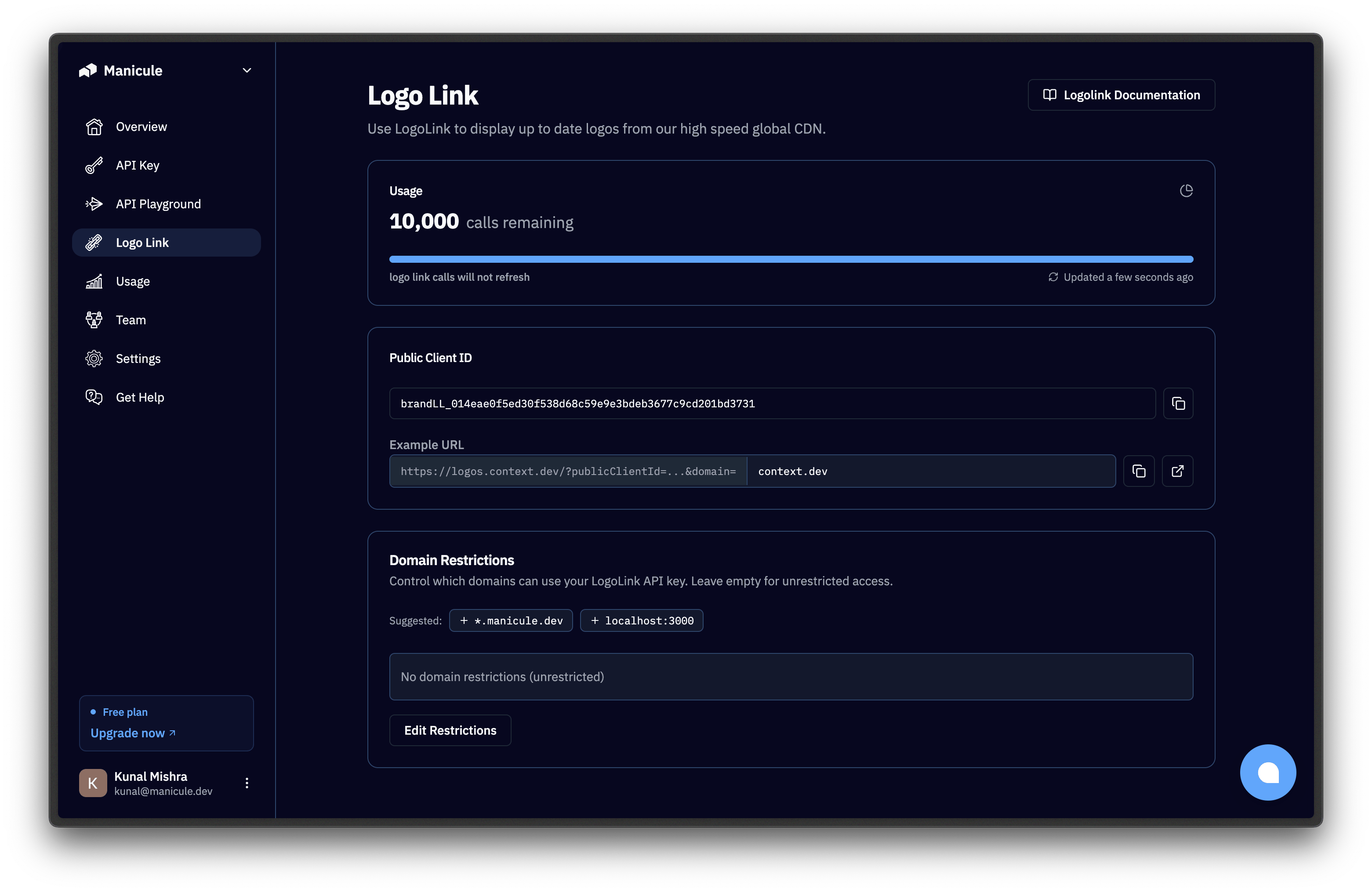 Select **Domain Restrictions** and add every site that will embed the image, such as `app.example.com` and the exact localhost origin used during development.
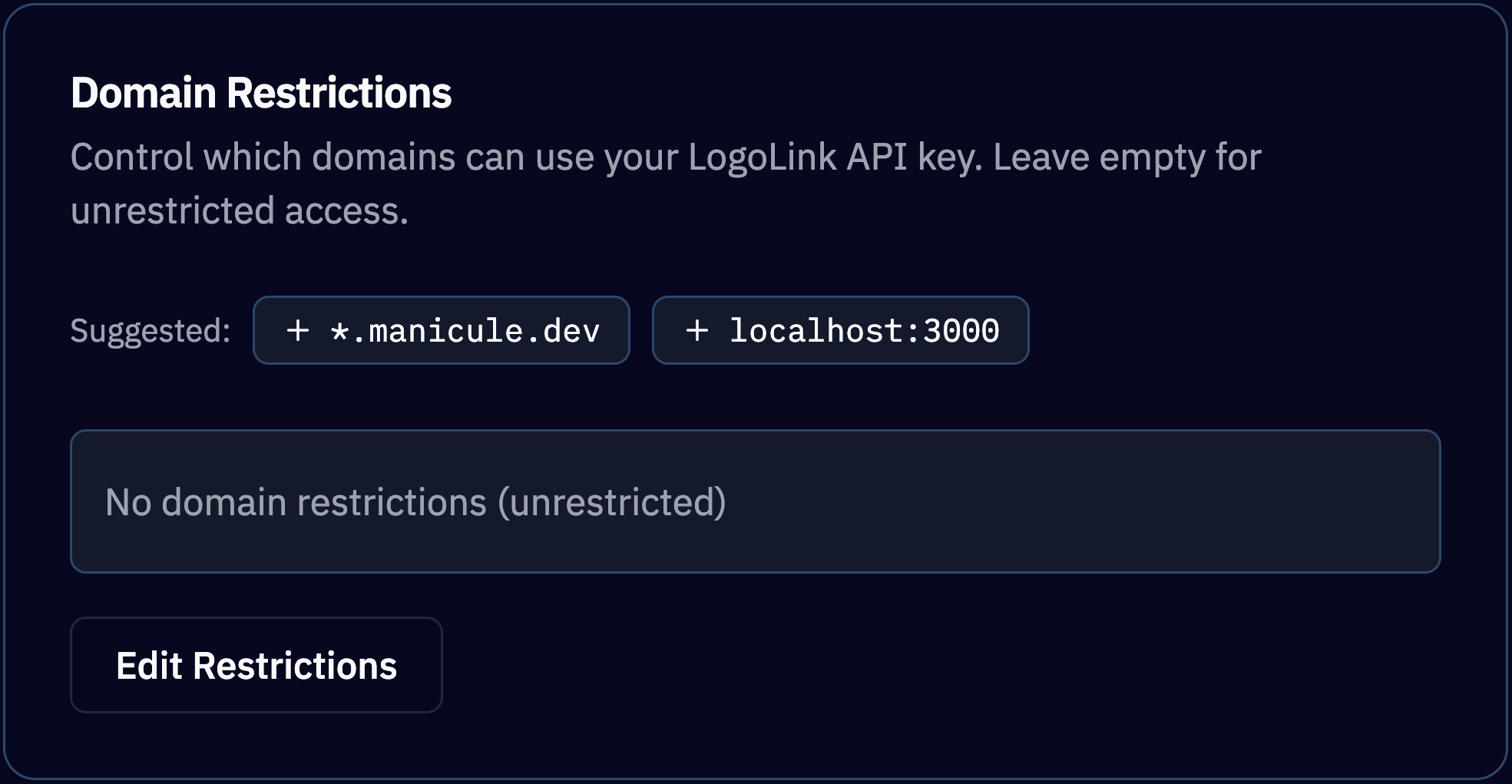 A public client ID is intentionally visible in frontend code. Treat it as frontend-safe only after you configure and test its referring-domain restrictions.
## Build the image URL
```text theme={null}
https://logos.context.dev/?publicClientId=brandLL_xxx&domain=github.com
```
| Parameter | Required | Description |
| ---------------- | -------- | ------------------------------------------------------------------------------------------------------------- |
| `publicClientId` | Yes | Public client ID from the Logo Link dashboard. |
| `domain` | Yes | Company domain, such as `github.com`. |
| `theme` | No | Use `light` to prefer a dark asset for a light surface, or `dark` to prefer a light asset for a dark surface. |
| `type` | No | Use `icon` for a near-square mark or `wordmark` for a wider or taller wordmark. The default is `icon`. |
Logo Link accepts `GET` and `HEAD`. A successful `GET` returns raw image bytes rather than a JSON object. Follow its `Content-Type` and `Cache-Control` response headers.
## Embed the logo
```html theme={null}
A public client ID is intentionally visible in frontend code. Treat it as frontend-safe only after you configure and test its referring-domain restrictions.
## Build the image URL
```text theme={null}
https://logos.context.dev/?publicClientId=brandLL_xxx&domain=github.com
```
| Parameter | Required | Description |
| ---------------- | -------- | ------------------------------------------------------------------------------------------------------------- |
| `publicClientId` | Yes | Public client ID from the Logo Link dashboard. |
| `domain` | Yes | Company domain, such as `github.com`. |
| `theme` | No | Use `light` to prefer a dark asset for a light surface, or `dark` to prefer a light asset for a dark surface. |
| `type` | No | Use `icon` for a near-square mark or `wordmark` for a wider or taller wordmark. The default is `icon`. |
Logo Link accepts `GET` and `HEAD`. A successful `GET` returns raw image bytes rather than a JSON object. Follow its `Content-Type` and `Cache-Control` response headers.
## Embed the logo
```html theme={null}
 ```
```jsx theme={null}
function CompanyLogo({ companyName, domain }) {
const publicClientId = process.env.NEXT_PUBLIC_LOGOLINK_CLIENT_ID;
if (!publicClientId) throw new Error("Missing Logo Link public client ID");
const params = new URLSearchParams({
publicClientId,
domain,
type: "icon",
});
return (
```
```jsx theme={null}
function CompanyLogo({ companyName, domain }) {
const publicClientId = process.env.NEXT_PUBLIC_LOGOLINK_CLIENT_ID;
if (!publicClientId) throw new Error("Missing Logo Link public client ID");
const params = new URLSearchParams({
publicClientId,
domain,
type: "icon",
});
return (
 {
event.currentTarget.hidden = true;
}}
/>
);
}
```
```text theme={null}
=IMAGE("https://logos.context.dev/?publicClientId=brandLL_xxx&domain=" & ENCODEURL(A2))
```
Reserve image dimensions to prevent layout shift. If no logo is available, Logo Link returns a generated monogram SVG with status 200, or a generated name wordmark for `type=wordmark`. An invalid client ID, exhausted quota, or disallowed referring site can make the image fail to load.
## Choose the right product
| Need | Use |
| -------------------------------------------------------------- | ----------------------------------- |
| Display one hosted logo without storing the file | Logo Link |
| Retrieve multiple logos, colors, descriptions, or social links | [Brand API](/brand/overview) |
| Extract visual tokens or font files for review | [Styleguide API](/brand/styleguide) |
Logo Link has its own usage quota. Check allowances and usage in the [Logo Link dashboard](https://context.dev/dashboard/logolink).
## Usage restrictions
* Do not download, persist, or rehost image files returned by Logo Link.
* Normal caching performed according to the response headers is allowed.
* A returned logo identifies a company; it does not establish affiliation, sponsorship, or endorsement.
* Confirm that your presentation and use comply with applicable trademark rules and your agreement with Context.dev.
{
event.currentTarget.hidden = true;
}}
/>
);
}
```
```text theme={null}
=IMAGE("https://logos.context.dev/?publicClientId=brandLL_xxx&domain=" & ENCODEURL(A2))
```
Reserve image dimensions to prevent layout shift. If no logo is available, Logo Link returns a generated monogram SVG with status 200, or a generated name wordmark for `type=wordmark`. An invalid client ID, exhausted quota, or disallowed referring site can make the image fail to load.
## Choose the right product
| Need | Use |
| -------------------------------------------------------------- | ----------------------------------- |
| Display one hosted logo without storing the file | Logo Link |
| Retrieve multiple logos, colors, descriptions, or social links | [Brand API](/brand/overview) |
| Extract visual tokens or font files for review | [Styleguide API](/brand/styleguide) |
Logo Link has its own usage quota. Check allowances and usage in the [Logo Link dashboard](https://context.dev/dashboard/logolink).
## Usage restrictions
* Do not download, persist, or rehost image files returned by Logo Link.
* Normal caching performed according to the response headers is allowed.
* A returned logo identifies a company; it does not establish affiliation, sponsorship, or endorsement.
* Confirm that your presentation and use comply with applicable trademark rules and your agreement with Context.dev.