> ## Documentation Index
> Fetch the complete documentation index at: https://docs.context.dev/llms.txt
> Use this file to discover all available pages before exploring further.

# Quickstart

> Get an API key, install an SDK, and make your first Context.dev call in under five minutes.

By the end of this guide you'll have an API key, an installed SDK, and your first call to Context.dev's Brand, Web, and Classification API endpoints.

<Prompt description="Integrate Context.dev into my app" icon="sparkles" actions={["copy", "cursor"]}>
  I'm integrating Context.dev into my app. Help me:

  1. Install the official SDK for my language: `context.dev` on npm (TypeScript), `context.dev` on PyPI (Python), `context.dev` on RubyGems (Ruby), or `github.com/context-dot-dev/context-go-sdk` (Go). Or call the raw HTTP API with `curl` / `fetch`.
  2. Read the API key from the `CONTEXT_DEV_API_KEY` environment variable. Never hardcode it.
  3. Pick the right endpoint: `/brand/retrieve` for a domain → full brand record, `/web/scrape/markdown` for a URL → clean Markdown, `/brand/transaction_identifier` for a card-feed descriptor → resolved brand.
  4. Wrap the call with retry logic that handles HTTP 408 (cold-hit timeout) and 429 (rate limit) with exponential backoff.
  5. Surface the response or a graceful fallback when the brand isn't found.

  Docs: [https://docs.context.dev/quickstart](https://docs.context.dev/quickstart)
</Prompt>

## 0. Pick the right API for your job

Context.dev has 4 products:

<table>
  <thead>
    <tr>
      <th>API</th>
      <th>Use-case</th>
    </tr>
  </thead>

  <tbody>
    <tr>
      <td rowSpan={2}>Brand APIs</td>

      <td>
        <a href="/guides/get-brand-data">Look up a brand</a> by name, domain,
        email, stock ticker, or ISIN
      </td>
    </tr>

    <tr>
      <td>
        <a href="/guides/extract-design-system-from-website#extract-the-full-styleguide">
          Extract a website's styleguide
        </a>

        : fonts, spacing, shadows, etc.
      </td>
    </tr>

    <tr>
      <td rowSpan={1}>Logo Link CDN</td>

      <td>
        <a href="/guides/get-logo-from-url">Get embeddable logo images</a> from
        a domain
      </td>
    </tr>

    <tr>
      <td rowSpan={7}>Web APIs</td>

      <td>
        <a href="/guides/scrape-websites-to-markdown#scrape-a-single-page-to-markdown">
          Scrape any website
        </a>

        {" "}

        into clean HTML/Markdown
      </td>
    </tr>

    <tr>
      <td>
        <a href="/guides/scrape-websites-to-markdown#crawl-a-whole-site">
          Crawl a whole site
        </a>

        {" "}

        and get clean Markdown for every page
      </td>
    </tr>

    <tr>
      <td>
        <a href="/guides/scrape-websites-to-markdown#get-all-urls-of-a-domain">
          Crawl a sitemap
        </a>

        {" "}

        to discover all URLs of a domain
      </td>
    </tr>

    <tr>
      <td>
        <a href="/guides/scrape-websites-to-markdown#extract-every-image-on-a-page">
          Extract every image
        </a>

        {" "}

        on a webpage
      </td>
    </tr>

    <tr>
      <td>
        <a href="/guides/take-webpage-screenshot">
          Capture a webpage screenshot
        </a>
      </td>
    </tr>

    <tr>
      <td>
        <a href="/guides/extract-product-from-websites">
          Extract product details
        </a>

        {" "}

        (name, price, features) from a page
      </td>
    </tr>

    <tr>
      <td>
        <a href="/guides/extract-structured-data-from-websites">
          Extract structured data
        </a>

        {" "}

        from a website's pages with a JSON Schema
      </td>
    </tr>

    <tr>
      <td rowSpan={2}>Classification APIs</td>

      <td>
        <a href="/guides/enrich-transaction-codes">
          Enrich a card-transaction descriptor
        </a>

        {" "}

        to a brand
      </td>
    </tr>

    <tr>
      <td>
        <a href="/guides/classification/overview">Classify a brand</a> into
        NAICS, SIC, or EIC industry codes
      </td>
    </tr>
  </tbody>
</table>

## 1. Get an API key

<Steps>
  <Step title="Sign up">
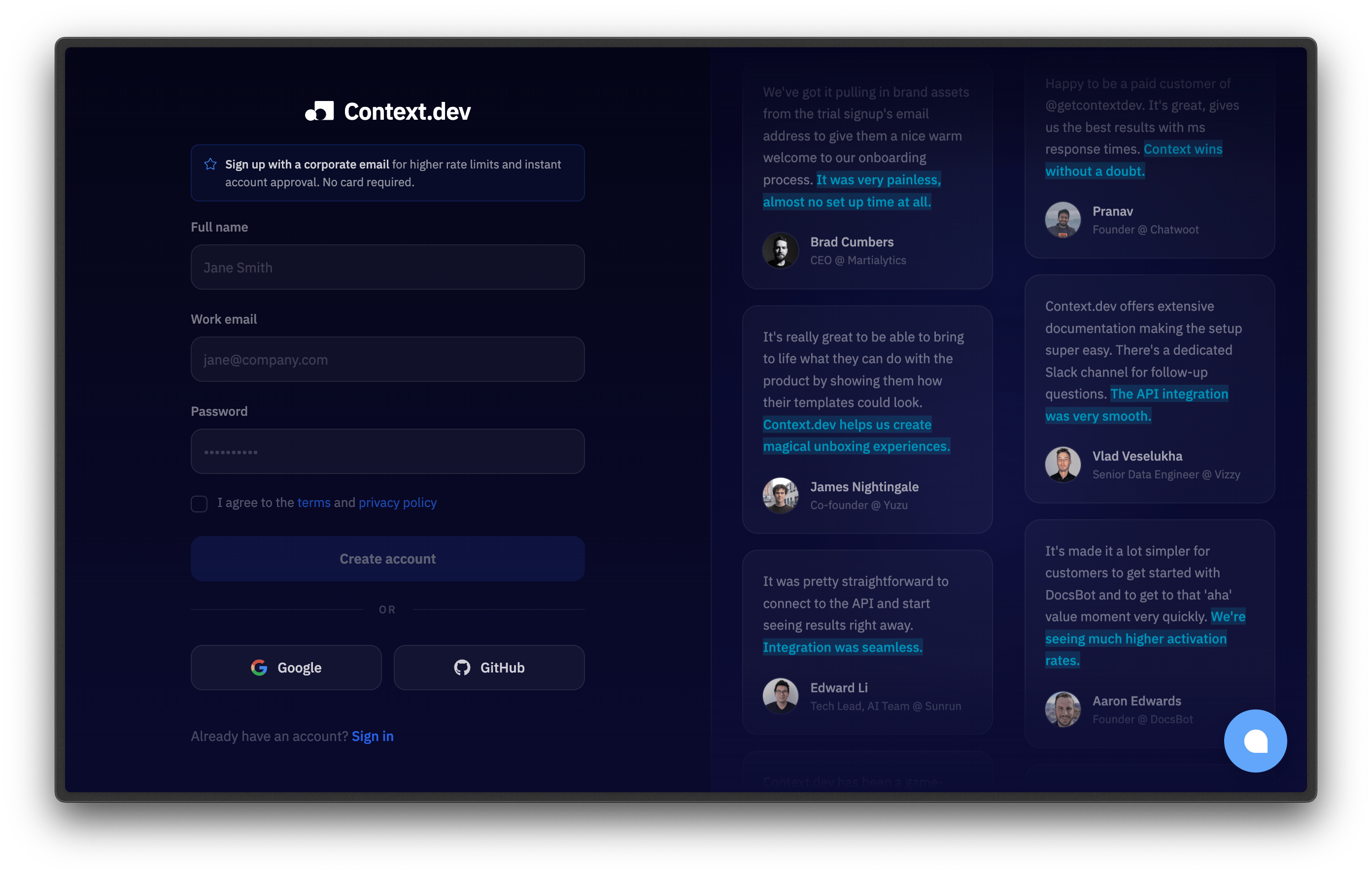
    Create an account at [context.dev/signup](https://context.dev/signup).

    <img src="https://mintcdn.com/branddev/repamerS-LSYfOs8/images/signup.png?fit=max&auto=format&n=repamerS-LSYfOs8&q=85&s=f40a86a0defa754278e9d32f118c4050" alt="Context.dev signup page" width="2784" height="1776" data-path="images/signup.png" />
  </Step>

  <Step title="Copy your key from the dashboard">
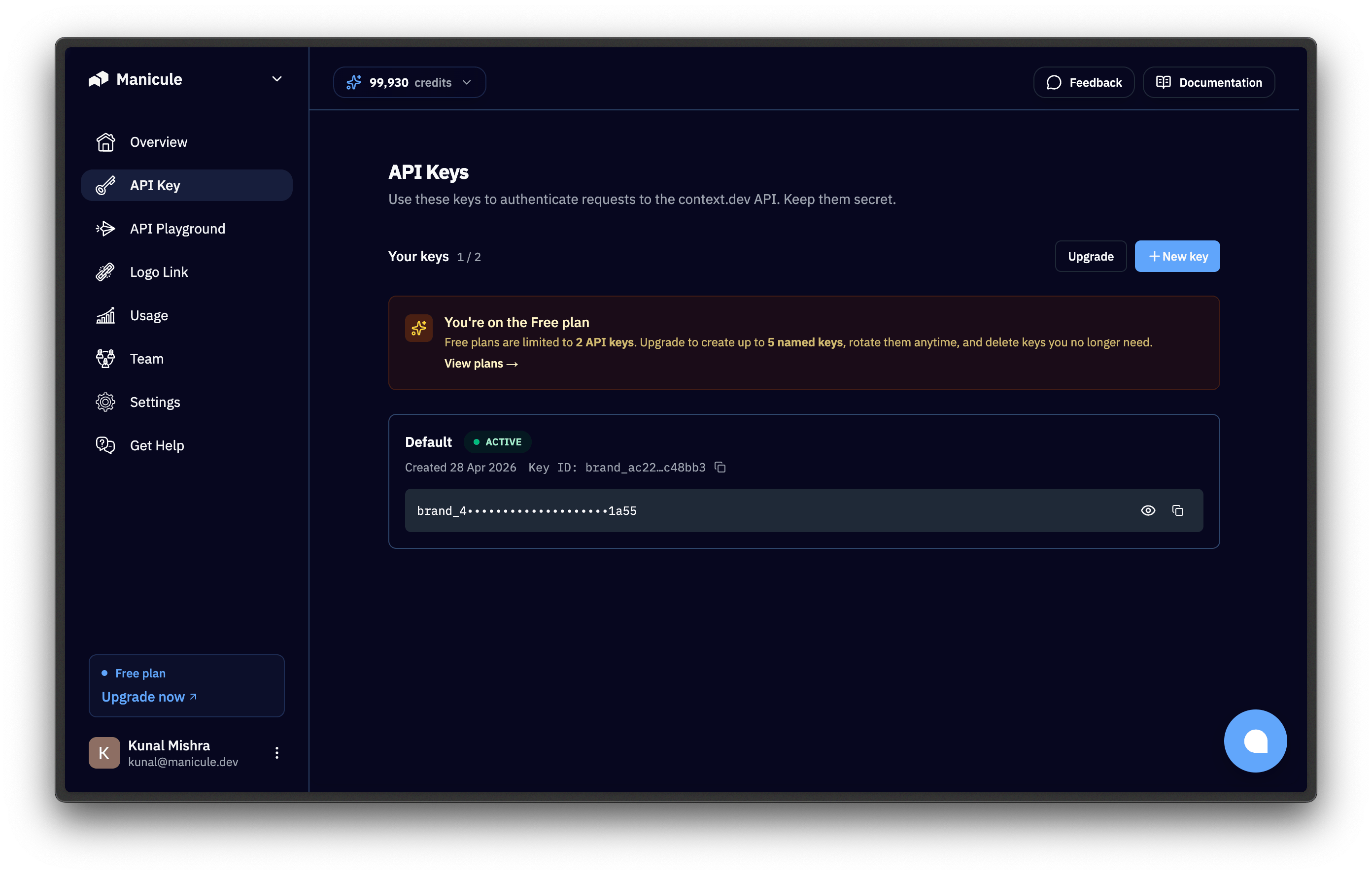
    Open the [dashboard](https://context.dev/dashboard) and copy the key from the "API Keys" section. It starts with `ctxt_secret_`.

    <img src="https://mintcdn.com/branddev/repamerS-LSYfOs8/images/api-keys.png?fit=max&auto=format&n=repamerS-LSYfOs8&q=85&s=d08f1d842eeb1efa546ad9f569c945bc" alt="API Keys section in the Context.dev dashboard" width="2784" height="1776" data-path="images/api-keys.png" />
  </Step>

  <Step title="Expose it as an environment variable">
    The SDKs and `curl` examples read `CONTEXT_DEV_API_KEY` from the environment. The SDKs read `CONTEXT_DEV_API_KEY` first and fall back to `CONTEXT_API_KEY` if it isn't set, so exporting `CONTEXT_DEV_API_KEY` alone is enough:

    ```bash terminal theme={null}
    export CONTEXT_DEV_API_KEY="ctxt_secret_..."
    ```
  </Step>
</Steps>

For local development, save the key to a `.env` file and make sure it's listed in your `.gitignore`.

For deployment, set the key in your platform's environment variable store:

* **Vercel:** `vercel env add CONTEXT_DEV_API_KEY`
* **Heroku:** `heroku config:set CONTEXT_DEV_API_KEY=ctxt_secret_...`
* **Docker:** pass via `-e CONTEXT_DEV_API_KEY=ctxt_secret_...` at `docker run`
* **AWS Lambda:** store in Secrets Manager or Parameter Store; expose to the function via its environment config

Never call the Context.dev API directly from a browser. The key would be visible to anyone with devtools. Always proxy through your backend.

## 2. Install an SDK

Context.dev publishes official SDKs for **TypeScript**, **Python**, **Ruby**, and **Go**. Pick the one for your stack.

<CodeGroup>
  ```bash TypeScript theme={null}
  npm install context.dev
  ```

  ```bash Python theme={null}
  pip install context.dev
  ```

  ```bash Ruby theme={null}
  # Requires Ruby 3.2 or newer.
  gem install context.dev
  ```

  ```bash Go theme={null}
  go get github.com/context-dot-dev/context-go-sdk
  ```
</CodeGroup>

You can also call the API directly with `curl`. No install required.

## 3. Make your first call

All code snippets expect `CONTEXT_DEV_API_KEY` to be set.

Depending on which API you chose:

<Tabs>
  <Tab title="Brand API">
    Retrieving a brand requires a brand identifier (name, domain, email, stock ticker, or ISIN code) and gives you its logo, name, slogan, description, address, social media handles, and more.

    [Read the full guide](/guides/get-brand-data)

    <CodeGroup>
      ```bash cURL theme={null}
      curl -G https://api.context.dev/v1/brand/retrieve \
        -H "Authorization: Bearer $CONTEXT_DEV_API_KEY" \
        --data-urlencode "domain=airbnb.com"
      ```

      ```typescript TypeScript theme={null}
      import ContextDev from "context.dev";

      const client = new ContextDev({
        apiKey: process.env.CONTEXT_DEV_API_KEY,
      });

      const { brand } = await client.brand.retrieve({ domain: "airbnb.com" });

      console.log(brand.title, brand.colors[0]?.hex, brand.logos[0]?.url);
      ```

      ```python Python theme={null}
      import os
      from context.dev import ContextDev

      client = ContextDev(api_key=os.environ["CONTEXT_DEV_API_KEY"])

      response = client.brand.retrieve(domain="airbnb.com")
      brand = response.brand

      first_color = brand.colors[0].hex if brand.colors else None
      first_logo = brand.logos[0].url if brand.logos else None
      print(brand.title, first_color, first_logo)
      ```

      ```ruby Ruby theme={null}
      require "context_dev"

      client = ContextDev::Client.new(api_key: ENV.fetch("CONTEXT_DEV_API_KEY"))

      response = client.brand.retrieve(domain: "airbnb.com")
      brand = response.brand

      puts [brand.title, brand.colors.first&.hex, brand.logos.first&.url].inspect
      ```

      ```go Go theme={null}
      package main

      import (
          "context"
          "fmt"
          "os"

          contextdev "github.com/context-dot-dev/context-go-sdk"
          "github.com/context-dot-dev/context-go-sdk/option"
      )

      func main() {
          client := contextdev.NewClient(
              option.WithAPIKey(os.Getenv("CONTEXT_DEV_API_KEY")),
          )

          resp, err := client.Brand.Get(context.TODO(), contextdev.BrandGetParams{
              Domain: "airbnb.com",
          })
          if err != nil {
              panic(err)
          }

          fmt.Println(resp.Brand.Title)
          if len(resp.Brand.Colors) > 0 {
              fmt.Println(resp.Brand.Colors[0].Hex)
          }
          if len(resp.Brand.Logos) > 0 {
              fmt.Println(resp.Brand.Logos[0].URL)
          }
      }
      ```
    </CodeGroup>

    <Badge color="blue" icon="coins">10 credits per successful call</Badge>
  </Tab>

  <Tab title="Web API">
    With Context.dev's Web APIs, you can:

    * [Scrape clean HTML/Markdown from URLs](/guides/scrape-websites-to-markdown#scrape-a-single-page-to-markdown)
    * [Extract structured data](/guides/extract-structured-data-from-websites) from a website by passing a JSON Schema.
    * [Extract every image on a page](/guides/scrape-websites-to-markdown#extract-every-image-on-a-page)
    * [Capture webpage screenshots](/guides/take-webpage-screenshot)
    * [Crawl a sitemap to discover all URLs of a domain](/guides/scrape-websites-to-markdown#get-all-urls-of-a-domain)
    * [Crawl an entire website into per-page Markdown](/guides/scrape-websites-to-markdown#crawl-a-whole-site)
    * [Pull a website's styleguide](/guides/extract-design-system-from-website#extract-the-full-styleguide): fonts, typography, spacing, shadows, components, and colors
    * [Extract product details](/guides/extract-product-from-websites) (name, price, features) from a product page.

    Looking for embeddable logos? That's [Logo Link](/guides/get-logo-from-url), Context.dev's separate CDN product. It embeds a logo for any domain with one `src` URL, no API call required.

    For this quickstart, let's use the webpage scraping endpoint. Pass in any URL and it returns clean, LLM-ready Markdown:

    <CodeGroup>
      ```bash cURL theme={null}
      curl -G https://api.context.dev/v1/web/scrape/markdown \
        -H "Authorization: Bearer $CONTEXT_DEV_API_KEY" \
        --data-urlencode "url=https://airbnb.com"
      ```

      ```typescript TypeScript theme={null}
      import ContextDev from "context.dev";

      const client = new ContextDev({
        apiKey: process.env.CONTEXT_DEV_API_KEY,
      });

      const response = await client.web.webScrapeMd({ url: "https://airbnb.com" });

      console.log(response.markdown);
      ```

      ```python Python theme={null}
      import os
      from context.dev import ContextDev

      client = ContextDev(api_key=os.environ["CONTEXT_DEV_API_KEY"])

      response = client.web.web_scrape_md(url="https://airbnb.com")

      print(response.markdown)
      ```

      ```ruby Ruby theme={null}
      require "context_dev"

      client = ContextDev::Client.new(api_key: ENV.fetch("CONTEXT_DEV_API_KEY"))

      response = client.web.web_scrape_md(url: "https://airbnb.com")

      puts response.markdown
      ```

      ```go Go theme={null}
      package main

      import (
          "context"
          "fmt"
          "os"

          contextdev "github.com/context-dot-dev/context-go-sdk"
          "github.com/context-dot-dev/context-go-sdk/option"
      )

      func main() {
          client := contextdev.NewClient(
              option.WithAPIKey(os.Getenv("CONTEXT_DEV_API_KEY")),
          )

          resp, err := client.Web.WebScrapeMd(context.TODO(), contextdev.WebWebScrapeMdParams{
              URL: "https://airbnb.com",
          })
          if err != nil {
              panic(err)
          }

          fmt.Println(resp.Markdown)
      }
      ```
    </CodeGroup>

    <Badge color="blue" icon="coins">1 credit per successful call</Badge>
  </Tab>

  <Tab title="Classification APIs">
    With Context.dev's Classification APIs, you can:

    * Get brand details from [a card transaction descriptor](/guides/enrich-transaction-codes)
    * [Classify a brand into NAICS industry codes](/guides/classification/NAICS) (2022 NAICS hierarchy)
    * [Classify a brand into SIC industry codes](/guides/classification/SIC) (1987 SIC or SEC EDGAR)
    * Read [EIC industries](/guides/classification/EIC) (Context.dev's own taxonomy). There's no dedicated EIC endpoint; EIC ships inline under `industries.eic` on every full brand response at no extra cost

    For this quickstart, let's use the transaction identifier endpoint. Pass in a card transaction descriptor and it returns the resolved brand record:

    <CodeGroup>
      ```bash cURL theme={null}
      curl -G https://api.context.dev/v1/brand/transaction_identifier \
        -H "Authorization: Bearer $CONTEXT_DEV_API_KEY" \
        --data-urlencode "transaction_info=STARBUCKS STORE 12345" \
        --data-urlencode "country_gl=us"
      ```

      ```typescript TypeScript theme={null}
      import ContextDev from "context.dev";

      const client = new ContextDev({
        apiKey: process.env.CONTEXT_DEV_API_KEY,
      });

      const response = await client.brand.identifyFromTransaction({
        transaction_info: "STARBUCKS STORE 12345",
        country_gl: "us",
      });

      console.log(response.brand.title, response.brand.domain);
      ```

      ```python Python theme={null}
      import os
      from context.dev import ContextDev

      client = ContextDev(api_key=os.environ["CONTEXT_DEV_API_KEY"])

      response = client.brand.identify_from_transaction(
          transaction_info="STARBUCKS STORE 12345",
          country_gl="us",
      )

      print(response.brand.title, response.brand.domain)
      ```

      ```ruby Ruby theme={null}
      require "context_dev"

      client = ContextDev::Client.new(api_key: ENV.fetch("CONTEXT_DEV_API_KEY"))

      response = client.brand.identify_from_transaction(
        transaction_info: "STARBUCKS STORE 12345",
        country_gl: "us",
      )

      puts [response.brand.title, response.brand.domain].inspect
      ```

      ```go Go theme={null}
      package main

      import (
          "context"
          "fmt"
          "os"

          contextdev "github.com/context-dot-dev/context-go-sdk"
          "github.com/context-dot-dev/context-go-sdk/option"
      )

      func main() {
          client := contextdev.NewClient(
              option.WithAPIKey(os.Getenv("CONTEXT_DEV_API_KEY")),
          )

          resp, err := client.Brand.IdentifyFromTransaction(context.TODO(),
              contextdev.BrandIdentifyFromTransactionParams{
                  TransactionInfo: "STARBUCKS STORE 12345",
                  CountryGl:       contextdev.BrandIdentifyFromTransactionParamsCountryGlUs,
              })
          if err != nil {
              panic(err)
          }

          fmt.Println(resp.Brand.Title, resp.Brand.Domain)
      }
      ```
    </CodeGroup>

    <Badge color="blue" icon="coins">10 credits per successful call</Badge>
  </Tab>
</Tabs>

## 4. Understand the response

Brand and Classification endpoints return JSON with `status`, `code`, and a `brand` object. The Web Markdown endpoint returns `success`, `url`, and `markdown`.

<Tabs>
  <Tab title="Brand API">
    Calling `/brand/retrieve` with `domain=airbnb.com` returns the brand record for Airbnb.

    ```json brand.retrieve response expandable theme={null}
    {
      "status": "ok",
      "code": 200,
      "brand": {
        "domain": "airbnb.com",
        "title": "Airbnb",
        "description": "Airbnb is a global online community marketplace that connects hosts with guests...",
        "slogan": "Belong Anywhere",
        "colors": [
          { "hex": "#fc3c5c", "name": "Radical Red" },
          { "hex": "#fc9cb4", "name": "Saira Red" },
          { "hex": "#fb5c74", "name": "Ponceau" }
        ],
        "logos": [
          {
            "url": "https://media.brand.dev/4ae9a10b-ffde-45c8-b5c1-c1e7cef5b716.png",
            "mode": "light",
            "type": "icon",
            "colors": [{ "hex": "#fc3c5c", "name": "Radical Red" }],
            "resolution": { "width": 250, "height": 250, "aspect_ratio": 1 }
          }
        ],
        "backdrops": [
          {
            "url": "https://media.brand.dev/example-backdrop.png",
            "colors": [{ "hex": "#fc3c5c", "name": "Radical Red" }],
            "resolution": { "width": 1200, "height": 630, "aspect_ratio": 1.9 }
          }
        ],
        "address": {
          "street": "888 Brannan Street",
          "city": "San Francisco",
          "state_province": "California",
          "state_code": "CA",
          "country": "United States",
          "country_code": "US",
          "postal_code": "94103"
        },
        "socials": [
          { "type": "x",         "url": "https://x.com/airbnb" },
          { "type": "facebook",  "url": "https://facebook.com/airbnb" },
          { "type": "linkedin",  "url": "https://linkedin.com/company/airbnb" },
          { "type": "instagram", "url": "https://instagram.com/airbnb" }
        ],
        "stock": { "ticker": "ABNB", "exchange": "NASDAQ" },
        "phone": "+1-415-555-0100",
        "is_nsfw": false,
        "industries": {
          "eic": [
            { "industry": "Hospitality & Tourism", "subindustry": "Vacation Rentals & Short-Term Stays" },
            { "industry": "Technology",            "subindustry": "eCommerce & Marketplace Platforms" }
          ]
        },
        "links": { "blog": null, "careers": null, "privacy": null, "terms": null, "contact": null, "pricing": null },
        "primary_language": "english"
      }
    }
    ```

    | Field                    | Type    | Description                                                                                                                                                |
    | ------------------------ | ------- | ---------------------------------------------------------------------------------------------------------------------------------------------------------- |
    | `brand.title`            | string  | Company name.                                                                                                                                              |
    | `brand.domain`           | string  | Canonical domain.                                                                                                                                          |
    | `brand.description`      | string  | Brief description of the brand.                                                                                                                            |
    | `brand.slogan`           | string  | The brand's slogan.                                                                                                                                        |
    | `brand.colors[]`         | array   | Brand colors. Each has `hex` and `name`.                                                                                                                   |
    | `brand.logos[]`          | array   | Logos associated with the brand. Each has `url`, `mode` (`light`, `dark`, `has_opaque_background`), `type` (`icon`, `logo`), `colors[]`, and `resolution`. |
    | `brand.backdrops[]`      | array   | Backdrop images for the brand. Each has `url`, `colors[]`, and `resolution`.                                                                               |
    | `brand.address`          | object  | `street`, `city`, `state_province`, `state_code`, `country`, `country_code`, `postal_code`.                                                                |
    | `brand.socials[]`        | array   | Social profile URLs. Each has `type` (`x`, `facebook`, `linkedin`, `instagram`, …) and `url`.                                                              |
    | `brand.stock`            | object  | `ticker` and `exchange`. `null` for private companies.                                                                                                     |
    | `brand.phone`            | string  | Company phone number.                                                                                                                                      |
    | `brand.is_nsfw`          | boolean | Indicates whether the brand content is not safe for work (NSFW).                                                                                           |
    | `brand.industries.eic[]` | array   | Easy Industry Classification industry and subindustry pairs.                                                                                               |
    | `brand.links`            | object  | Important website links (`careers`, `privacy`, `terms`, `contact`, `blog`, `pricing`); fields may be `null` when not found.                                |
    | `brand.primary_language` | string  | Primary language of the brand's website content, or `null` when not detected.                                                                              |
  </Tab>

  <Tab title="Web API">
    Calling `/web/scrape/markdown` with `url=https://airbnb.com` returns clean Markdown:

    ```json webScrapeMd response theme={null}
    {
      "success": true,
      "url": "https://airbnb.com",
      "markdown": "[Skip to content](https://airbnb.com/#site-content)\n\n# Airbnb homepage\n\n[HomesHomes](https://airbnb.com/homes) [ExperiencesExperiences, new](https://airbnb.com/experiences) [ServicesServices, new](https://airbnb.com/services)\n\nWhere\n\nWhen\n\nAdd dates\n\nWho\n\nAdd guests\n\n[Become a host](https://airbnb.com/#guest-header-become-a-host-menu)\n\n[Help Center](https://airbnb.com/help)\n\n..."
    }
    ```

    | Field      | Type    | Description                                                        |
    | ---------- | ------- | ------------------------------------------------------------------ |
    | `success`  | boolean | Indicates success. On a successful response this is always `true`. |
    | `url`      | string  | The URL that was scraped.                                          |
    | `markdown` | string  | Page content converted to GitHub Flavored Markdown.                |
  </Tab>

  <Tab title="Classification APIs">
    Calling `/brand/transaction_identifier` with `transaction_info=STARBUCKS STORE 12345&country_gl=us` resolves the descriptor and returns the brand record for Starbucks:

    ```json brand.transaction_identifier response expandable theme={null}
    {
      "status": "ok",
      "code": 200,
      "brand": {
        "domain": "starbucks.com",
        "title": "Starbucks",
        "description": "Starbucks is a global coffee company that puts people at the heart of its business...",
        "slogan": "Inspiring and nurturing the human spirit — one person, one cup",
        "colors": [
          { "hex": "#0bac66", "name": "Secret Garden" },
          { "hex": "#7cd4b4", "name": "Seafoam Blue" },
          { "hex": "#307e63", "name": "Trans Tasman" }
        ],
        "logos": [
          {
            "url": "https://media.brand.dev/67dc7846-2ca2-4a7b-9877-6bb5a5e2c0e0.png",
            "mode": "has_opaque_background",
            "type": "icon",
            "colors": [
              { "hex": "#0bac66", "name": "Secret Garden" },
              { "hex": "#7cd4b4", "name": "Seafoam Blue" }
            ],
            "resolution": { "width": 180, "height": 180, "aspect_ratio": 1 }
          }
        ],
        "industries": {
          "eic": [
            { "industry": "Hospitality & Tourism", "subindustry": "Cafes & Coffee Shops" }
          ]
        },
        "socials": [
          { "type": "x", "url": "https://x.com/starbucks" },
          { "type": "instagram", "url": "https://instagram.com/starbucks" }
        ],
        "stock": { "ticker": "SBUX", "exchange": "NASDAQ" }
      }
    }
    ```

    | Field     | Type   | Description                                                                                     |
    | --------- | ------ | ----------------------------------------------------------------------------------------------- |
    | `status`  | string | `"ok"` on a confident match; `"error"` when not identified.                                     |
    | `code`    | number | HTTP status mirror. `400` with `error_code: "NOT_FOUND"` when the descriptor can't be resolved. |
    | `brand.*` | object | Identical shape to `/brand/retrieve`; see the Brand API tab above for the full field reference. |

    Pass `mcc`, `city`, and `country_gl` for higher confidence on ambiguous descriptors.
  </Tab>
</Tabs>

## 5. Handle errors

A non-2xx response returns an `error` envelope. The common ones:

| Status | Meaning                                                    | What to do                                                                              |
| ------ | ---------------------------------------------------------- | --------------------------------------------------------------------------------------- |
| 401    | API key missing, invalid, or deleted                       | Re-check the env var and the dashboard.                                                 |
| 408    | Cold-hit timeout (rare; first crawl exceeded the deadline) | Retry once; the second hit is warm. Better: [prefetch](/optimization/prefetching).      |
| 422    | Disposable or free-email address on `retrieve-by-email`    | Skip the call for personal addresses.                                                   |
| 429    | Rate limit                                                 | Wait per the `Retry-After` header; see [Handle Rate Limits](/optimization/rate-limits). |
| 500    | Transient server error                                     | Retry once with backoff; if it persists, contact support.                               |

A retry pattern that covers 408 and 429:

<CodeGroup>
  ```typescript TypeScript theme={null}
  import ContextDev from "context.dev";

  const client = new ContextDev({ apiKey: process.env.CONTEXT_DEV_API_KEY });

  async function retrieveWithRetry(domain: string, maxRetries = 3) {
    for (let i = 0; i < maxRetries; i++) {
      try {
        const { brand } = await client.brand.retrieve({ domain });
        return brand;
      } catch (err: any) {
        const retryable = err.status === 408 || err.status === 429;
        if (retryable && i < maxRetries - 1) {
          await new Promise((r) => setTimeout(r, 2 ** i * 1000));
          continue;
        }
        throw err;
      }
    }
    throw new Error("unreachable");
  }
  ```

  ```python Python theme={null}
  import os, time
  from context.dev import ContextDev, APIStatusError

  client = ContextDev(api_key=os.environ["CONTEXT_DEV_API_KEY"])

  def retrieve_with_retry(domain: str, max_retries: int = 3):
      for i in range(max_retries):
          try:
              return client.brand.retrieve(domain=domain).brand
          except APIStatusError as e:
              if e.status_code in (408, 429) and i < max_retries - 1:
                  time.sleep(2 ** i)
                  continue
              raise
  ```

  ```ruby Ruby theme={null}
  require "context_dev"

  CLIENT = ContextDev::Client.new(api_key: ENV.fetch("CONTEXT_DEV_API_KEY"))

  def retrieve_with_retry(domain, max_retries: 3)
    max_retries.times do |i|
      return CLIENT.brand.retrieve(domain: domain).brand
    rescue ContextDev::Errors::APIStatusError => e
      raise unless [408, 429].include?(e.status) && i < max_retries - 1
      sleep(2 ** i)
    end
  end
  ```

  ```go Go theme={null}
  package main

  import (
      "context"
      "errors"
      "os"
      "time"

      contextdev "github.com/context-dot-dev/context-go-sdk"
      "github.com/context-dot-dev/context-go-sdk/option"
  )

  var client = contextdev.NewClient(
      option.WithAPIKey(os.Getenv("CONTEXT_DEV_API_KEY")),
  )

  func retrieveWithRetry(domain string, maxRetries int) (*contextdev.BrandGetResponseBrand, error) {
      for i := 0; i < maxRetries; i++ {
          resp, err := client.Brand.Get(context.TODO(), contextdev.BrandGetParams{Domain: domain})
          if err == nil {
              return &resp.Brand, nil
          }
          var apiErr *contextdev.Error
          if errors.As(err, &apiErr) && (apiErr.StatusCode == 408 || apiErr.StatusCode == 429) && i < maxRetries-1 {
              time.Sleep(time.Duration(1<<i) * time.Second)
              continue
          }
          return nil, err
      }
      return nil, errors.New("unreachable")
  }
  ```
</CodeGroup>

For the full catalog of error codes and remediations, see [Troubleshooting](/optimization/troubleshooting).

## Next steps

<CardGroup cols={2}>
  <Card title="Prefetch for Faster Response" icon="bolt" href="/optimization/prefetching">
    Hide cold-hit latency from your users.
  </Card>

  <Card title="Handle Rate Limits" icon="gauge-high" href="/optimization/rate-limits">
    Backoff strategies, client cache, and prefetch fallbacks.
  </Card>

  <Card title="Best Practices" icon="list-check" href="/optimization/best-practices">
    Caching, error handling, and key hygiene.
  </Card>

  <Card title="Troubleshooting" icon="bug" href="/optimization/troubleshooting">
    Status codes, retry patterns, and common errors.
  </Card>
</CardGroup>